Can You Trust AI Travel Recommendations? A Checklist for Accuracy, Feasibility, and Hidden Risks
AI travel planners hand you a polished, confident itinerary in under a minute — which is exactly the problem. Here's the three-part check (accuracy, feasibility, and hidden risk) for catching the mistakes before you book around them.
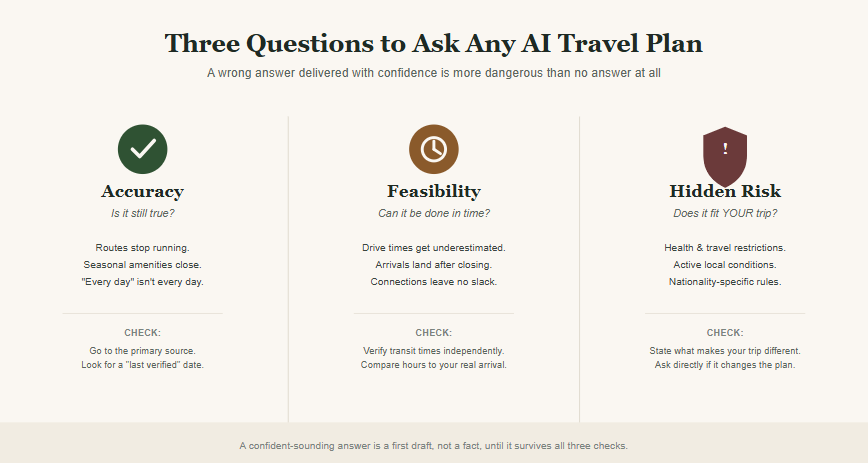
An AI travel planner will hand you a polished, detailed, extremely confident itinerary in under a minute. That confidence is the part worth worrying about. A wrong answer that sounds sure of itself is more dangerous than no answer at all, because nothing about it signals that you should double-check.
The short version: most AI itinerary mistakes fall into three buckets. Either the information used to be true and quietly stopped being true (accuracy), or every individual step is correct but the plan can't physically be completed on time (feasibility), or the plan is generic and never asked what actually makes your trip different from anyone else's (hidden risk). Knowing which bucket a mistake falls into tells you exactly what to check before you commit real money and real vacation days to a plan.
We build an AI travel planner for a living, so we've seen these three failure modes play out across thousands of real planning conversations. Here's what each one actually looks like, and how to catch it — whether you're using our tool, a competitor's, or just running your own plan through a sanity check.
Share
Start a trip Fortrip can actually defend.
Sketch a brief. We come back with an itinerary that reads like a recommendation, not a checklist — and tell you what we’d change about it.
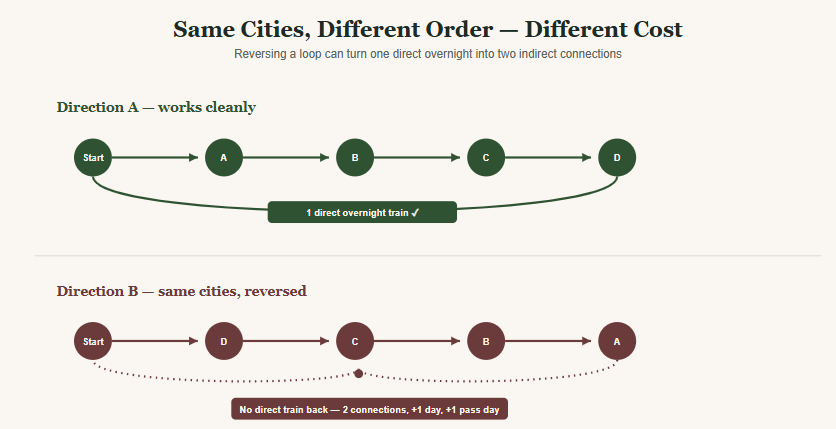
Same six cities, same total distance — one direction wrapped up with a single overnight train home, the other needed two connections and burned an extra day. We tested the same loop multiple ways to find out when reordering actually saves time or money, and when it just moves the cost around.
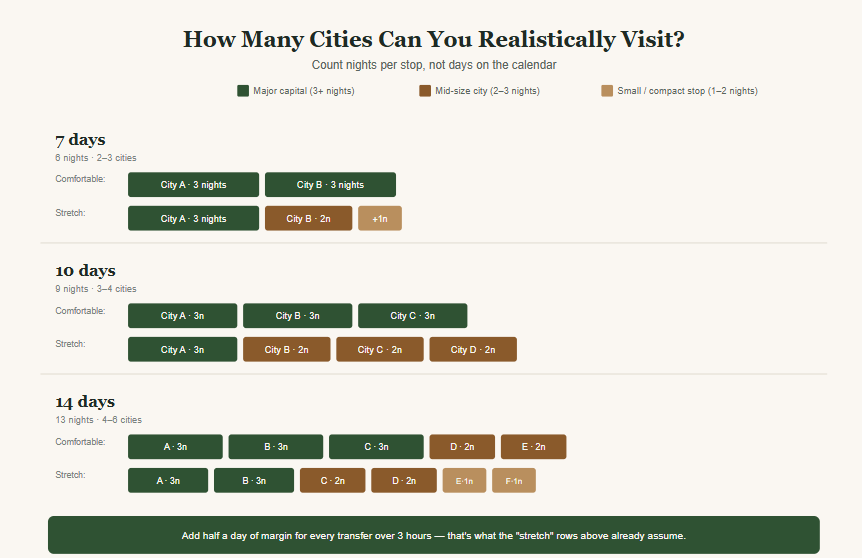
Most multi-city trips don't fall apart because of too few days — they fall apart because every stop got the same amount of time regardless of what it needed. Here's how many cities actually fit into 7, 10, or 14 days once you count nights instead of days.
Accuracy: is the information actually still true?
This is the easiest mistake to miss, because it doesn't look like a mistake. It looks like a completely normal, well-sourced answer.
Here's the problem: a lot of travel content on the internet was true when it was written and has since gone stale, quietly, with nobody updating the label. A blog post from a few years back still ranks on page one of Google. An AI model trained partly on that content repeats it as current fact. Nobody involved is lying to you. The information just aged out.
Routes and services that quietly stopped running
Ferry crossings, shuttle routes, and seasonal transport links get discontinued more often than travelers expect, and the old articles describing them rarely get taken down. A route can still be called "the classic way to get there" by half the search results, two full seasons after the operator stopped running it.
Seasonal amenities that aren't actually always open
A hotel or ryokan will list a private outdoor bath or a rooftop pool as a headline feature. What sometimes doesn't make it into the listing: the amenity closes for an entire season, for reasons as mundane as snow load on the structure, and only reopens months later.
The "closed on Mondays" detail nobody mentions
Palaces, state museums, and government-run sites across Europe close on a rotating weekday far more often than casual travel guides bother to flag. A plan that routes you there on the wrong day isn't wrong in spirit. It's wrong in the specific way that only shows up once you're standing at a locked gate.
How to check this yourself
For anything time-sensitive, go to the operator's own site, not a blog post about the operator, and look for a date. If a recommendation can't point to when it was last verified, treat it as a claim someone made, not a fact you can plan around.
Feasibility: can the plan actually be completed on time?
This is a different kind of mistake, and a sneakier one. Every line item in the itinerary can be individually correct, and the plan can still be physically impossible to pull off as written.
Feasibility problems hide in the gaps between stops, not in the stops themselves. Each destination looks reasonable on its own. It's only once you add up the transitions between them that the trip stops adding up.
Drive times that get quietly underestimated
Two landmarks that look close together on a small map can be six, eight, ten hours apart by road. On a seven-day trip, a single underestimated transfer can eat a third of the days you had planned to actually spend somewhere, with nothing in the plan calling that out.
Arriving after closing, by minutes
A bookshop, a specialty café, a small museum: the itinerary schedules your arrival at an hour that turns out to be after closing, not by hours, by a margin small enough that nobody thought to check it. Fifteen minutes late for a shop that shuts at seven is still too late.
Connections with no slack built in
A cave tour, a last boat departure, a timed-entry ticket: booked for a slot that assumes zero delay anywhere earlier in the day. One long lunch, one traffic jam, and the whole afternoon falls apart.
The uncomfortable pattern behind all three: these errors usually come from trying to fit too much in. The itinerary that tries hardest to be "complete" is often the one most likely to be infeasible, because there's no slack left to absorb the ordinary friction of a real travel day.
How to stress-test this yourself
Don't take the plan's own math at face value. Check transit times independently, in a mapping tool, and check posted operating hours against your actual planned arrival time, not just the date.
Hidden risk: does the plan account for what makes your trip different?
This is the hardest failure to catch, because it isn't a wrong answer. It's a correct answer to the wrong question. A recommendation can be fully accurate and fully feasible and still be the wrong plan for you specifically, because it was built for a generic traveler instead of the one actually taking the trip.
This is also the fastest way to tell whether an AI travel tool is genuinely personalizing anything, or just swapping your destination into a template.
Health and physical constraints that change what's safe
A traveler in a later stage of pregnancy runs into real, carrier-specific airline restrictions on international flights that vary by gestational week. None of that shows up in a standard destination guide, because a standard destination guide isn't written for that traveler.
Local conditions that are active right now, not typical for the season
A hiking region can be entirely closed off this week because of an active wildfire risk, something that has nothing to do with the usual season and everything to do with current conditions on the ground.
Borders, networks, and visa rules that aren't one-size-fits-all
Neighboring islands split by a national border can run on two completely separate mobile networks. A multi-country itinerary can require a visa for one leg and skip it entirely on the next, based purely on which passport is asking. None of this is visible on a map.
How to surface this yourself
Say out loud what makes your trip non-generic: health, nationality, timing against anything happening locally right now, and ask directly whether it changes anything. A plan that gives you the same answer regardless of what you tell it isn't actually adjusting for you.
Green flags vs. red flags in an AI travel tool
You don't need to become a fact-checker to use these three checks. You just need to notice how a tool behaves when you ask it to prove its work.
Green flags:
It points to something checkable, instead of stating a fact from memory
It says "I can't verify this" when it actually can't, instead of guessing
When you correct it, it tells you what changed and why
It names trade-offs instead of pretending every recommendation is a clean win
Red flags:
Every answer sounds equally confident, including the ones it has no way of actually knowing
Closures, hours, and route changes are stated without a source or a date
Correcting a mistake gets absorbed silently, as if the tool knew all along
Every option it presents sounds ideal, with no downside mentioned anywhere
How FortripAI's Trip Validator runs this exact checklist
We built this framework into the product, not just this article, because we kept watching the same three failure modes show up in real planning conversations.
FortripAI's Trip Validator takes an itinerary — one it generated for you, or one you already put together yourself and pasted in — and checks it against all three categories before you travel on it. It runs current information against the plan to catch outdated routes and seasonal closures, checks the actual time between stops against opening hours and posted schedules to catch feasibility gaps, and asks about the specifics of your trip so a health condition, a passport, or a local condition on the ground actually changes the recommendation instead of getting ignored.
It flags issues by severity instead of burying them in a wall of text, so you can see at a glance what needs fixing today versus what's a minor nice-to-have. And if something in the plan turns out to be wrong, it says so directly and tells you what changed.
If you've already built a trip somewhere else, whether that's a spreadsheet, a screenshot from a group chat, or an itinerary from another tool, you can run it through FortripAI's validator before you book anything.
FAQ
Can you trust AI-generated travel itineraries?
Not automatically. Treat a fluent, confident-sounding itinerary as a first draft rather than a finished plan, and check it against the three categories above: is the information current, is the timing actually achievable, and does it account for anything specific to your situation.
What mistakes do AI travel planners commonly make?
The three most common are outdated information (routes or amenities that no longer operate as described), underestimated logistics (drive times, opening hours, and connection buffers that don't hold up), and generic recommendations that ignore health, nationality, or local conditions specific to the traveler.
How do I check if an AI-generated itinerary is accurate?
Go to the primary source for anything time-sensitive, such as an operator's own website, rather than a blog post about it, and look for evidence the information has been checked recently. If nothing in the answer points to a source or a date, treat it as unverified.
Is it safe to use AI to plan an entire trip?
It's safe as a starting point if you or the tool itself verifies the plan afterward. The risk isn't in using AI to generate an itinerary. It's in booking flights and hotels around one that was never checked for feasibility or personal risk factors.
What's the difference between an AI itinerary generator and an AI trip validator?
A generator produces a new itinerary from scratch based on your preferences. A validator checks an itinerary you already have, whether AI-made or your own, against real-time information and your specific circumstances, and flags what needs to change before you travel on it.
Have an itinerary sitting in a spreadsheet or a group chat right now? Run it through FortripAI's Trip Validator before you book anything, and see what it catches.