Is Your ChatGPT Travel Itinerary Actually Realistic? 7 Mistakes to Catch Before You Book
ChatGPT can plan a Guatemala trip in seconds — but a validator caught an altitude risk, two 10+ hour transfer days, and a season the itinerary never accounted for. Here's what to check before you book.
Ask ChatGPT to plan a trip and it will hand you something impressive in under a minute — a clean day-by-day breakdown, logical routing, and a list of destinations that all genuinely deserve to be on the itinerary. It looks done.
It usually isn't.
The gap between "looks well-planned" and "is well-planned" is where most AI travel planning mistakes hide. ChatGPT is good at organizing information. It's much weaker at judging whether a trip is actually comfortable to live through — which days will wreck you, which transfers are quietly brutal, and which activities only make sense for a version of you that doesn't exist.
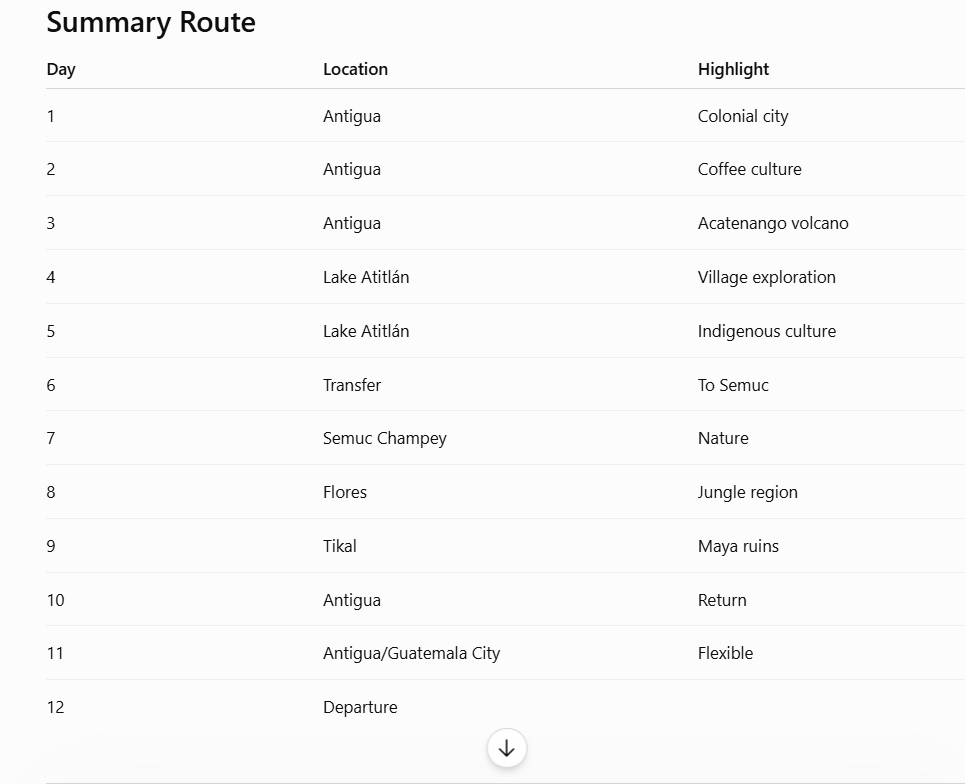
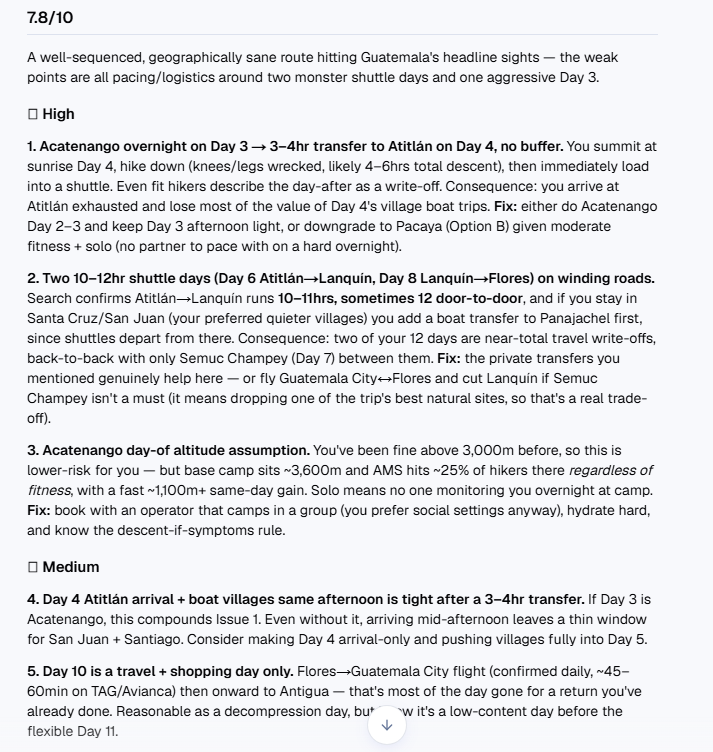
To see how big that gap really is, we took a 12-day Guatemala itinerary ChatGPT generated — Antigua, Lake Atitlán, Semuc Champey, and Tikal — and ran it through a travel itinerary validator instead of just reading it and nodding along. The route looked great on paper. Once we checked it against real transfer times, altitude data, and seasonal conditions, several problems showed up that a first read would never catch.
Share
Start a trip Fortrip can actually defend.
Sketch a brief. We come back with an itinerary that reads like a recommendation, not a checklist — and tell you what we’d change about it.
Most multi-city trips don't fall apart from one big mistake — they fall apart from a dozen small mismatches in timing, pacing, and logistics that never got checked. Here are the 12 we see most often, and how to catch them before you book.
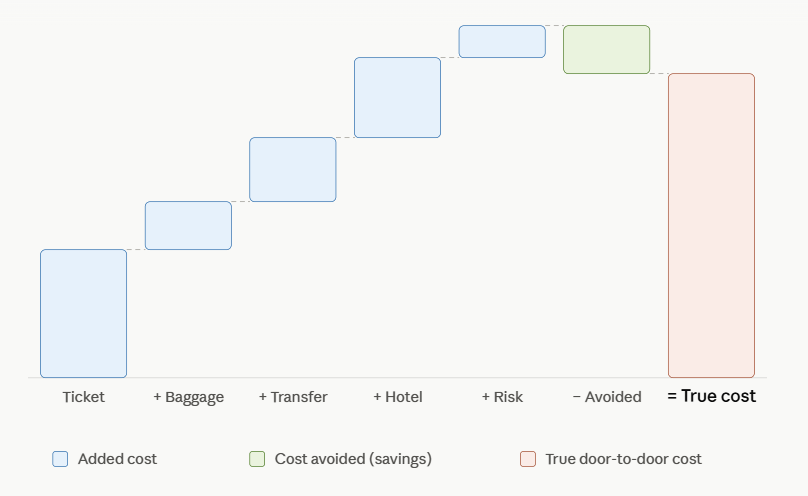
A cheap flight and a pricier train can end up costing the same once you add baggage, transfers, and an extra hotel night. Here's how to compare the full door-to-door cost — with five real routing cases where the obvious choice wasn't actually the cheapest one.
Here's what we found, and how to check your own ChatGPT itinerary for the same issues.
Why ChatGPT Itineraries Look Better Than They Actually Are
ChatGPT is working from patterns in travel writing, not from your fitness level, your travel dates, or what a 10-hour shuttle on a mountain road actually feels like on day six of a trip. It knows Antigua, Lake Atitlán, and Tikal are all worth visiting — and they are — but it doesn't know that stacking them in a certain order turns a third of your trip into recovery time.
That's the core issue with using an AI trip planner on its own: it optimizes for a schedule that fits, not a schedule you'll enjoy. Those aren't the same thing, and the difference usually doesn't show up until you're already there.
Mistake #1: No Recovery Day After Physically Demanding Activities
The Guatemala itinerary sends you on an overnight hike up Acatenango Volcano on day three, then straight into a 3–4 hour transfer to Lake Atitlán the next morning — followed by an afternoon of village-hopping by boat.
On paper, that's a normal-looking travel day. In practice, Acatenango's base camp sits around 3,600 meters, and even hikers with no history of altitude problems have roughly a 1-in-4 chance of some altitude sickness at that elevation. You're summiting at sunrise, hiking back down on tired legs, then loading into a shuttle a few hours later. Most travelers describe the day after Acatenango as a write-off, not a warm-up for more sightseeing.
What to check: look at what comes immediately after any hike, dive, or long physical activity in your itinerary. If the next block is a long transfer or a packed sightseeing day, that's a red flag ChatGPT won't raise on its own.
Mistake #2: Transfer Times That Look Fine Until You Actually Check Them
This itinerary includes two back-to-back overland transfers: Lake Atitlán to Lanquín, then Lanquín to Flores. ChatGPT lists both as roughly 8–10 hours. Real-world shuttle data puts the Atitlán–Lanquín leg closer to 10–11 hours, sometimes 12 door to door — and if you're staying in the quieter lakeside villages ChatGPT itself recommends (Santa Cruz or San Juan), you'll need a boat to Panajachel first just to catch the shuttle.
That's two of your twelve days spent almost entirely in transit, back to back, with only one full day at Semuc Champey between them.
What to check: search the actual route, not just the destinations. "8–10 hours" from an AI itinerary is often an estimate, not a verified number — and mountain roads, ferry connections, and shared shuttle schedules routinely add hours that a straight-line map distance won't show you.
Mistake #3: One Itinerary, Every Fitness Level
ChatGPT defaults to recommending Acatenango as the main event of the trip, full stop. For an experienced hiker, that's a great call. For someone with limited hiking experience or any sensitivity to altitude, it can end up being the hardest, most physically taxing day of the entire trip — placed right at the start, before you've had a chance to acclimatize to anything else.
A generic itinerary can't know your fitness level unless you tell it, and even then, it often defaults to the "iconic" version of an experience rather than the version that fits you.
What to check: for any activity flagged as strenuous, look for the itinerary's built-in alternative (in this case, the easier Pacaya Volcano half-day) and actually consider it, rather than assuming the "recommended" option is recommended for you specifically.
Mistake #4: Trusting the Map Instead of the Road
Two towns can look close together on Google Maps and still take most of a day to travel between, because of mountain switchbacks, unpaved sections, ferry crossings, or shuttles that only run on fixed schedules. That's exactly the case between Lake Atitlán and Lanquín in Guatemala — the difficulty isn't distance, it's terrain.
What to check: whenever an itinerary changes regions, verify the actual mode of transport and road conditions, not just the number of kilometers. A "short" transfer on paper can turn into most of a travel day.
Mistake #5: Ignoring the Season You're Actually Traveling In
The Guatemala itinerary doesn't adjust anything for time of year. That matters more than it seems: Guatemala's rainy season runs roughly May through October, with afternoon and evening showers as the norm and August typically the wettest month. That directly affects volcano sunset views, sunrise hikes, and road conditions on those long overland transfers.
What to check: ask specifically whether your travel dates fall in shoulder or rainy season for your destination, and whether the itinerary front-loads weather-dependent activities (like sunrise viewpoints) into the morning, when conditions are usually better.
Mistake #6: Days That Are Technically Possible, Not Actually Enjoyable
Day four of the Guatemala itinerary packs in an arrival, a hotel check-in, a boat ride, two village visits, and a return before sunset. Every individual piece is reasonable. Stacked together after a multi-hour transfer, it's rushed.
A simple test: if your transportation runs two hours late, does the rest of the day still work? If the answer is no, the day has zero margin for anything going wrong — which, on a 12-day international trip, something usually will.
Mistake #7: The Real Risk Often Isn't Safety — It's Wasted Time
Nothing in this itinerary is unsafe. That's not really the point. The bigger risk with AI-generated itineraries is quieter: losing days of a trip you paid for because the schedule was packed too tightly or the transfers ate more energy than expected. A good itinerary isn't the one that fits the most attractions into twelve days — it's the one where you actually have the energy to enjoy each one.
A Quick Checklist for Validating Any ChatGPT Travel Itinerary
Before you book flights or hotels, run your itinerary through these questions:
Is a physically demanding activity followed immediately by a long transfer?
Are the listed transfer times realistic once you account for ferries, road conditions, and waiting time?
Does every activity actually match your fitness level, not just the "recommended" option?
Does the plan account for the season you're traveling in?
Is the arrival day (or any transfer day) overloaded with activities right after?
If something runs two hours late, does the day still hold together?
Would adding one extra night somewhere meaningfully improve the pace?
If you're answering "no" or "not sure" to more than a couple of these, it's worth adjusting the plan before you lock in reservations.
Try It on Your Own Itinerary
We ran this Guatemala trip through Fortrip's itinerary validator, which is exactly what surfaced the Acatenango-to-Atitlán crunch, the real transfer times, and the seasonal timing issues above — the kind of practical checking a first read-through of an AI itinerary won't catch. If you've got a ChatGPT-generated trip sitting in a tab right now, run it through Fortrip's Validator before you book anything. It takes a few minutes and can save you a day or two of your actual vacation.
FAQ
Is ChatGPT reliable for planning a full trip itinerary?
It's a strong starting point — it's fast, and it's usually right about which destinations are worth including. Where it falls short is judging real-world logistics: transfer times, physical difficulty, and seasonal timing. Treat its output as a first draft to validate, not a finished plan.
What's the biggest mistake people make with AI-generated itineraries?
Booking based on how the itinerary reads rather than checking what each day actually requires. A schedule can look balanced in a bullet-point list and still be exhausting once you account for altitude, transfer times, or back-to-back demanding days.
How do I check if a transfer time in my itinerary is accurate?
Search the specific route rather than relying on straight-line map distance. Look for recent traveler reports or shuttle company schedules, and factor in ferries, unpaved roads, or shared shuttle stops that a distance estimate won't include.
Should I still use ChatGPT to plan my trip?
Yes — it's genuinely useful for generating routes, destination ideas, and a rough structure quickly. Just don't skip the step of checking the plan against real logistics, your own fitness level, and your actual travel dates before you book.
How is a travel itinerary validator different from just asking ChatGPT to double-check itself?
A validator is built to specifically flag the practical issues ChatGPT tends to miss — recovery time after strenuous activities, real transfer durations, seasonal conditions, and fitness-level mismatches — rather than generating another version of the same optimistic plan.